What Is a Seamless Pattern?
Guide · Updated 19 October 2026
In short: a seamless pattern is a design that tiles edge-to-edge with no visible line, offset, or colour jump where one copy meets the next. It's what lets a small design file cover fabric, wallpaper, or a product mockup of any size.
Why "seamless" matters
Print-on-demand platforms, fabric printers, and wallpaper manufacturers all work the same way: they take one small repeating tile and print it over and over across a much larger surface — a bolt of fabric, a phone case, a roll of wallpaper. If the tile isn't seamless, every repeat shows a visible seam: a hard line, a colour mismatch, or a shape that gets cut off on one edge and doesn't continue correctly on the other.
This is the single most common reason a design gets rejected by a POD platform's print-readiness check, or comes back from a printer looking wrong even though it looked fine on screen.
What makes a pattern seamless
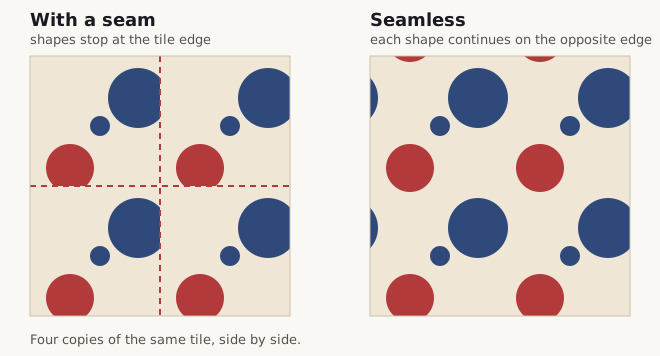
- Matching edges. Whatever crosses the left edge of the tile must continue, at the exact same position, on the right edge — and the same for top and bottom.
- Consistent colour and density. The pattern shouldn't look noticeably "busier" or lighter near the edges than in the centre — that draws the eye to the seam even when the edges technically match.
- An exact repeat unit. For woven patterns like plaid, the repeat is defined by the colour sequence (the sett); for florals or geometric motifs, it's defined by how elements are placed and rotated within the tile boundary.
Seamless pattern examples
Most repeating prints you already own are seamless patterns. Four common families, and what sets the repeat in each:
- Plaid, tartan and gingham. The repeat is the thread sequence, the sett, run in both the warp and weft. One full sett across and one down is the whole tile. The guide to gingham, tartan and plaid explains how the three differ.
- Florals. Motifs are scattered so that a flower crossing one edge reappears on the opposite edge, and the gaps are spread evenly so no empty band shows where tiles meet.
- Geometrics. Stripes, chevrons, dots and lattices: the tile is one period of the shape, which makes them the easiest family to keep seamless.
- Watercolour and texture. Washes and paper grain have no hard shapes to line up, so the risk is a shift in tone at the border rather than a broken motif.
Seamless pattern vs repeat pattern
The two terms overlap but are not the same. A repeat pattern is any design built from one unit copied in a regular grid. A seamless pattern is a repeat whose joins cannot be seen. Every seamless pattern is a repeat; not every repeat is seamless — a tiled photo with a hard line every 20 centimetres is a repeat, and a bad one. In textile and wallpaper trades the unit itself is called the repeat (“a 64 cm repeat”), so a printer asking for your repeat size is asking for the width and height of the seamless tile.
A placement print is the opposite of both: one image in one position, such as a graphic on the front of a T-shirt. It is never tiled, so it never needs to be seamless.
Types of repeat
A seamless tile can be laid out in more than one way. A straight repeat stacks every tile directly under the last, a half-drop moves each column down by half a tile, and a brick repeat moves each row sideways by half. The same artwork looks different in each, and a half-drop or brick layout hides the grid that a straight repeat can make obvious. The guide to straight, half-drop and brick repeats shows them side by side.
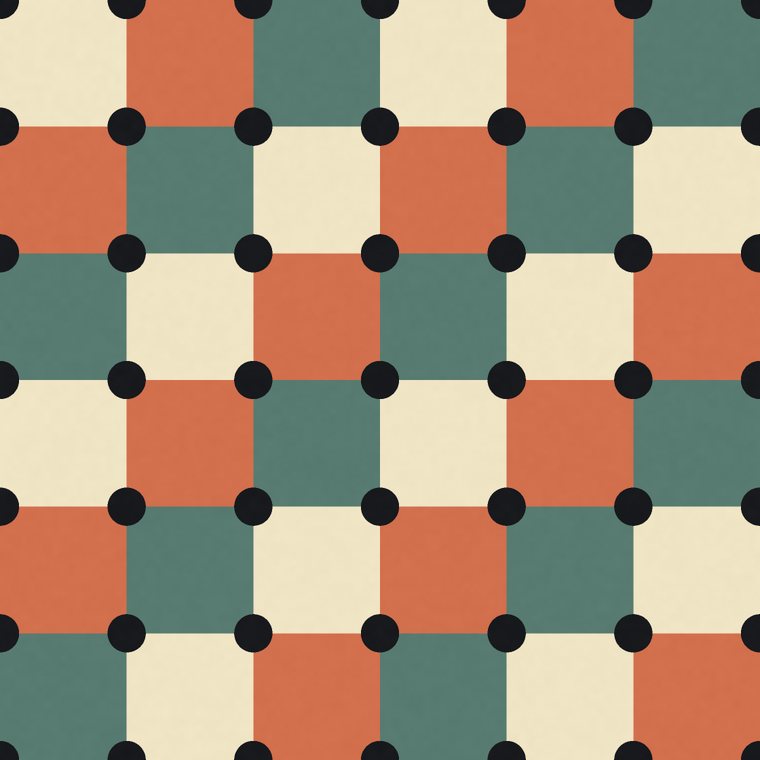
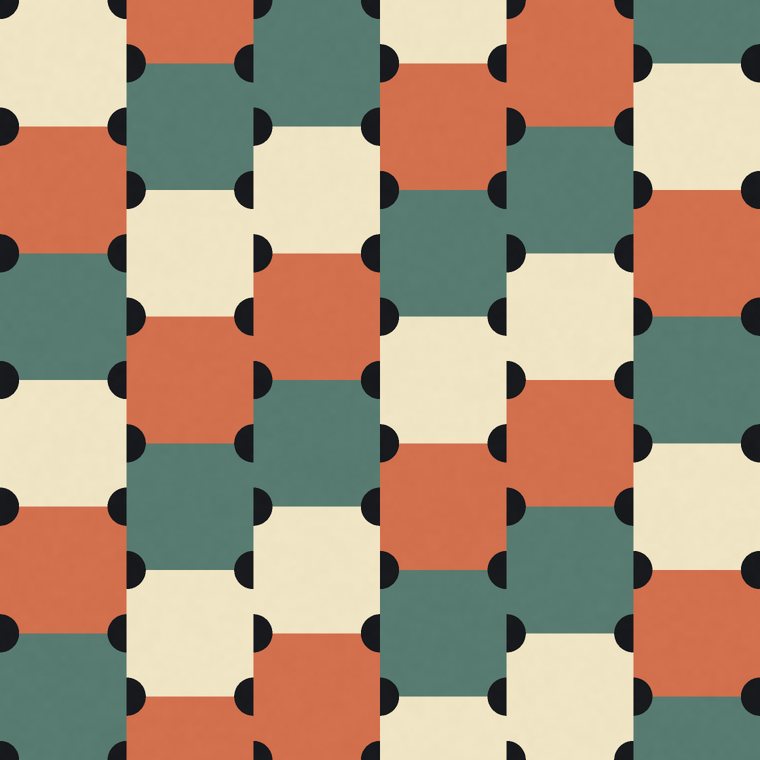
Above, one tile in a straight repeat and then in a half-drop. Both are seamless; only the rhythm changes.
Where seamless patterns are used
- Fabric. Digital fabric printers and print-on-demand fabric shops print a tile across the whole width of the roll. The repeat size decides how large the motif is on the cloth, so it is given in centimetres or inches, not pixels.
- Wallpaper. Rolls are hung side by side, so the tile has to match across the vertical join as well as down the length — which is why wallpaper is so often a half-drop.
- Print-on-demand products. Phone cases, mugs, notebooks, leggings and cushions all take a seamless tile and scale it to the product. Each platform has its own minimum pixel sizes; print-on-demand pixel sizes lists them, and the DPI guide explains the arithmetic.
- Gift wrap, packaging and stationery. The same tile, cut to whatever sheet the printer runs.
- Screens and 3D. Website backgrounds and the textures on 3D models and in games are seamless tiles too, repeated by the browser or the renderer instead of a press.
Common mistakes that show a seam
- A motif that almost touches the edge. A shape that stops a pixel short of the border is not cut, but it leaves a thin empty line that reads as a seam once tiled.
- Lighting or gradients across the tile. A tile that is lighter on one side than the other makes a stripe of contrast at every join, even when every edge matches.
- A single standout motif. One large flower in an otherwise even tile becomes a grid of large flowers when repeated, and the grid is what the eye finds.
- Resizing after the fact. Scaling a tile by an odd percentage can leave a half-pixel row at the edge, which prints as a hairline. Export at the final size.
- JPEG compression. Heavy compression blurs the edges differently from the middle; keep the master as PNG and compress only copies.
How to make a seamless pattern
There are two routes. In a general image editor you draw a tile, shift it by half its width and height with an offset filter so the edges move to the middle, repair the joins there, and check it tiled. In a pattern generator the repeat is part of the design from the start, so the edges already match and the work is choosing the design. For woven designs, the step-by-step guide on how to design a seamless plaid pattern follows the second route from the thread sequence to the export.
How to check before you export
The free seamless pattern checker does the first three steps for you: drop a tile and it repeats it, offsets it by half and measures each join.
- Tile the design 2×2 or 3×3 and view it at the size it will actually be printed — problems that are invisible at thumbnail size often show up at full scale.
- Look specifically at the seams, not the centre of the tile. The centre is where design tools put the most detail and where problems are least visible.
- Check corners separately from edges — a pattern can match cleanly along edges but still show a visible cross at the four corners where two seams meet.
A pattern generator that renders true tiled previews — rather than a single static image — lets you catch this before export instead of after a printer sends back a proof.
Try it live: every pattern in the seamless pattern generator renders as a true tiled repeat by construction — plaid, floral, geometric, watercolour and pen — so what you see in the preview is what prints. Free to start, no credit card required.
Open the pattern generator →Frequently asked questions
What does "seamless" mean in design?
It means a surface shows no visible join where one copy of a tile meets the next, so the pattern reads as one continuous surface however far it is repeated.
Is "seamless" the same as "tileable"?
Yes, the terms are used interchangeably — both describe a pattern that repeats without a visible join.
Do I need special software to make a seamless pattern?
General image editors can make seamless patterns, but you have to manually align edges yourself (often with an "offset" filter). A dedicated pattern generator builds the repeat into the design from the start, so there's no manual alignment step.
Why did my POD platform reject my pattern?
Most rejections come down to either a visible seam (see above) or resolution too low for the product size. Check the platform's specific DPI and pixel-dimension requirements before exporting.
What's the difference between a seamless pattern and a repeat pattern?
A repeat pattern is any design made by copying one unit in a regular grid; a seamless pattern is a repeat whose joins cannot be seen. Every seamless pattern is a repeat, but a repeat with visible edges is not seamless.
What size should a seamless pattern be?
Decide the physical size of one repeat first, in centimetres or inches, then multiply by the print resolution: at 150 DPI a 20 cm repeat is about 1181 pixels, at 300 DPI about 2362. Print-on-demand platforms publish their own minimum pixel sizes per product — see print-on-demand pixel sizes.