Watercolour Guide: Your Sett, Painted
Engine guide · Updated 19 September 2026
In short: Watercolour takes the sett you built in Sett and paints it — wet, loose colour on textured paper instead of woven thread. It is the same design: same stripes, same colours, same repeat. Change the sett and the painting follows.
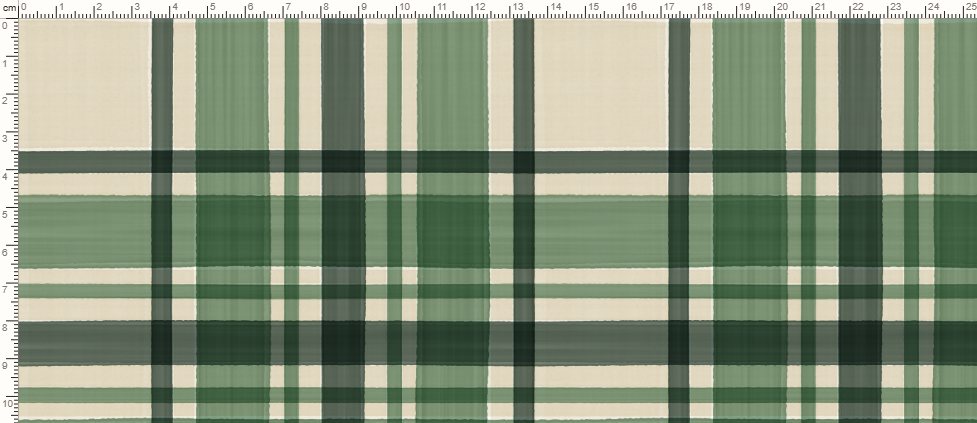
What Watercolour is for
Where Sett draws a physical loom, Watercolour is for the opposite feeling: a hand-painted plaid with translucent bands, soft edges and visible paper. It suits home décor, stationery and apparel prints that want an artisanal look rather than a technical weave. Because it reads the same design as Sett, you can switch between the two and carry the stripes and colours across.
The brush
The hand controls decide how the paint behaves:
- Pigment — how much colour is in the wash. Low is a tint the paper shows through; high is nearly the colour itself.
- Hand — how far the whole stroke wanders off its line, like a brush pulled by hand. The edge stays sharp; it moves rather than softening.
- Pressure — how much the stroke swells and thins along its length.
- Edge tooth — the fine raggedness the paper leaves along the edge of a stroke.
- Pooling — pigment gathering along the edge where the wash dried, the dark rim a real wash has.
- Streak — brush streaks along the stroke.
- Paper — the sheet's tooth and fibre, and how much heavy pigment settles into it.
- Gap — paper left bare between strokes, as a share of the stripe. A little white between them is what makes them read as strokes.
You can also describe the look in the words box, for example "navy and red tartan, wet and loose, textured paper". The stage is labelled as a seamless tile, and the ruler shows real centimetres.
Files
Export a PNG at 72, 150, 300 or 600 dpi; the painting is redrawn at the export size rather than enlarged. "On a product" shows the design on a framed print or a papered wall, and on a photographed shirt and dress. Every plan designs and exports Watercolour, and the plans differ in export points (EP) a month, tile size and dpi. The pricing page has the full table.
Who uses Watercolour
Etsy sellers in home décor and stationery, and designers who want a plaid that does not read as technical textile: softer, more editorial, closer to painted fabric than woven cloth.
Try it live: Watercolour exports on every plan, Free included.
Choose what to create →Frequently asked questions
Is Watercolour available on the Free plan?
Yes. Every plan designs and exports Watercolour; the plans differ in export points (EP) a month, tile size and dpi.
Does it tile seamlessly despite the soft edges?
Yes. The stage shows a seamless tile, so the painting repeats edge to edge.
Can I keep my Sett design?
Yes. Watercolour and Pen are the same cloth in another hand, so the stripes, counts, colours and pivots carry between them and Sett.