Floral Guide: Seamless Flower Repeats
Engine guide · Updated 19 September 2026
In short: Floral lays a scene of drawn motifs over a seamless tile — flowers, branches, leaves and more — in tossed, ditsy or bouquet layouts, with your palette deciding the colour. It is built for fabric repeats, wallpaper, nursery goods and digital paper.
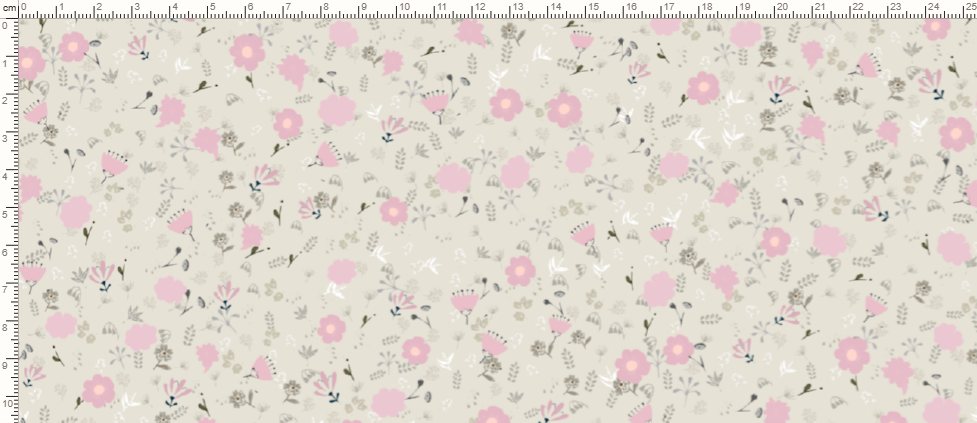
What Floral is for
Floral composes drawn motifs into a layout that tiles seamlessly. It is separate from the cloth engines (Sett, Watercolour and Pen), which start from a thread count: here you choose a family of motifs, a scale and a way of laying them out. It targets surface pattern design directly: fabric yardage, wallpaper, nursery décor and scrapbooking paper.
Start with a family, a scale and a sentence
- Family — choose one, or leave it on "free" to draw from all of them. The library holds hundreds of drawn motifs in about eighteen families, including animal, botanical, celestial, foliage, forest, gift, holiday, paisley, sea life and several spring and branch sets.
- Scale — ditsy, medium, large, or random. It sets the size and the number of motifs together; a ditsy repeat carries hundreds of small flowers, a large one a few big ones.
- Words — type "ditsy spring flowers in bouquets, dusty pink on cream" and press "make it". It reads a family, a scale, a layout (tossed, bouquet or directional), a repeat (straight, half-drop or brick), sparse or dense, crisp or wobbly, and colours, in English and Turkish.
Key controls
- Layers — hero, support and filler. Filler goes underneath and hero on top; hero is placed first and gets the run of the tile. Each layer has a count, a size and an overlay (opacity), and you can pick which motifs it may use. Choosing several motifs stops the same flower recurring across the tile.
- Distribution — tossed, bouquet (with cluster size and gap) or directional (in bands), plus spacing, fill, overlap and rotation. A coverage readout warns you when the tile is too full to place every motif.
- Repeat — straight, half-drop or brick, and the repeat width in centimetres (12 to 80). A bigger repeat keeps the flowers the same size and adds more of them.
- Variation between copies — bend, scale, texture, drift and turn keep repeated motifs from looking identical.
- Colour — pick a ground from the palette, then let the colours map automatically from each drawing, or choose each drawing's key colour by hand. Hue carry sets how much of each colour's hue difference is kept (at zero the scene goes monochrome), and contrast pushes flowers and leaves apart in tone so the cloth does not read flat. Roles (hero, support, filler) can each take their own palette colours.
Export builds a true seamless tile from the motif drawings, not a screen capture, so it holds up at print resolution. Choose 72, 150, 300 or 600 dpi; "On a product" shows the design on a framed print or a papered wall, and on a photographed shirt and dress. Every plan can export Floral, and the plans differ in export points (EP) a month, tile size and dpi. See the pricing page for the full table.
Who uses Floral
Surface pattern designers building fabric and wallpaper collections, and Etsy and print-on-demand sellers in home décor and nursery niches who need a botanical repeat that reads as designed rather than a stock clip-art scatter.
Try it live: Floral exports on every plan, Free included.
Choose what to create →Frequently asked questions
Is Floral available on the Free plan?
Yes. Every plan designs and exports Floral; the plans differ in export points (EP) a month, tile size and dpi.
Can I control which flowers appear?
Yes. Choose a family, and within each layer choose which motifs it may use. Scale and count decide how many appear.
Can I make a coordinated range from one layout?
Yes. The layout is separate from the colour, so you can recolour the same scene from a different palette and keep the design.